Skip to content
(212) 686-6066
Mon - Sat: 7am - 8pm
Sun: 9am - 5pm
Twitter
Facebook-f
Instagram
Youtube
Donate Now
Request Appointment
Abortion
Abortion Services
Abortion Pill
First Trimester Abortion
Second Trimester & Later Abortion
Pregnancy Calculator
Laborless Abortion® procedure
Laborless D&E®
Laborless Abortion® procedure FAQ
Aspiration Procedure
Induction Procedure
Anesthesia Options
Ectopic Pregnancy
Fetal Anomalies
Private Client Services
Abortion Post Op Instructions
Free Abortion Services in New York
Gynecology
Gynecology
Pregnancy Symptoms
Pregnancy Calculator
Pap Smear
Fibroids
Pelvic Pain | Endometriosis
LEEP
HPV Vaccine
On-site Sonography
Ectopic Pregnancy
STIs
STI Services
Chlamydia
Trichomoniasis
Genital Herpes
Candida
HPV Vaccine
HIV
Gonorrhea
Bacterial Vaginosis
Pelvic Inflammatory Disease (PID)
Syphilis Symptoms
Contraception
Contraception Services
Birth Control Pill
IUD Birth Control
Depo-Provera
Diaphragm Birth Control
Morning After Pill
NEXPLANON Implant
Telehealth
Telehealth
Telehealth Gynecology
Telehealth Procedure Follow Up
Post-Procedure Video Follow Up
Patient Resources
Free Abortion Services in New York
Patients’ Bill of Rights
Patient Portal Instructions
Patient Portal
Patient Registration Form
Fees & Insurance
Patient Funding
Directions
Healthcare Proxy Form
Pre-procedural Form
Records Request Form
About
Employment Opportunities
About Us
Fees and Insurance
Funding
Reviews
Blog
Contact
Menu
Abortion
Abortion Services
Abortion Pill
First Trimester Abortion
Second Trimester & Later Abortion
Pregnancy Calculator
Laborless Abortion® procedure
Laborless D&E®
Laborless Abortion® procedure FAQ
Aspiration Procedure
Induction Procedure
Anesthesia Options
Ectopic Pregnancy
Fetal Anomalies
Private Client Services
Abortion Post Op Instructions
Free Abortion Services in New York
Gynecology
Gynecology
Pregnancy Symptoms
Pregnancy Calculator
Pap Smear
Fibroids
Pelvic Pain | Endometriosis
LEEP
HPV Vaccine
On-site Sonography
Ectopic Pregnancy
STIs
STI Services
Chlamydia
Trichomoniasis
Genital Herpes
Candida
HPV Vaccine
HIV
Gonorrhea
Bacterial Vaginosis
Pelvic Inflammatory Disease (PID)
Syphilis Symptoms
Contraception
Contraception Services
Birth Control Pill
IUD Birth Control
Depo-Provera
Diaphragm Birth Control
Morning After Pill
NEXPLANON Implant
Telehealth
Telehealth
Telehealth Gynecology
Telehealth Procedure Follow Up
Post-Procedure Video Follow Up
Patient Resources
Free Abortion Services in New York
Patients’ Bill of Rights
Patient Portal Instructions
Patient Portal
Patient Registration Form
Fees & Insurance
Patient Funding
Directions
Healthcare Proxy Form
Pre-procedural Form
Records Request Form
About
Employment Opportunities
About Us
Fees and Insurance
Funding
Reviews
Blog
Contact
Donate Now
About
Patient Portal Instructions
ABout
Patient Portal Instructions
Patient Portal
How to set up your patient portal.
You will receive an email (
view example email
) from Parkmed NYC. If you have not received an email, please call Parkmed NYC at
(212) 686-6066
.
Make sure your email is displaying images. You should see an
orange button
that says “
Set up Portal Account
”
Click the
orange button
.
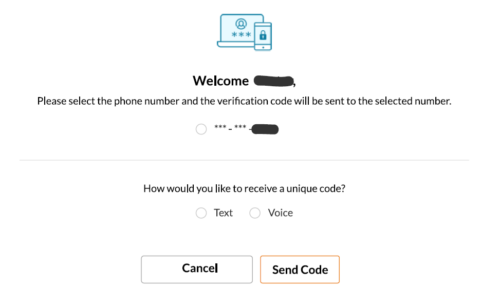
You will be redirected to complete the verification process.
Confirm your telephone number and follow the provided steps to get your verification number.
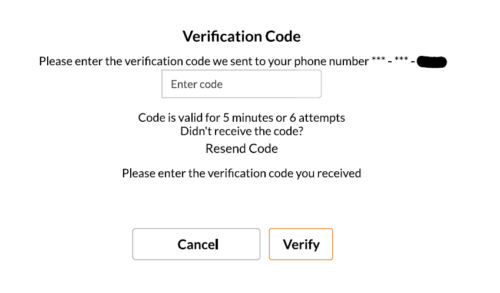
Enter your verification code which is only valid for 5 minutes or 6 attempts. You can resend a code if needed.
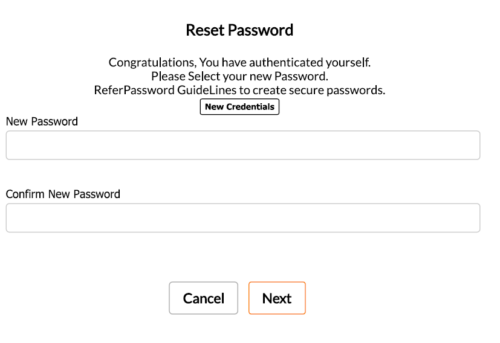
Once your account is verified you can set up a password.
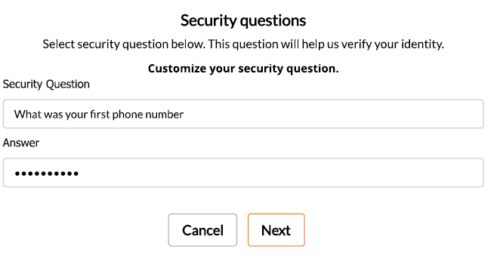
You will then set up your security questions.
Read and agree to consent forms.
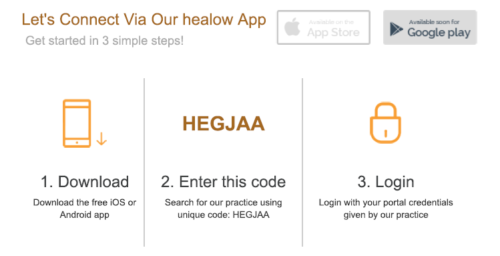
Everything is ready and you should see the home page of the portal. It is recommended that you download the Healow App.
Download App IOS
Download App Android
Example Email
Team-based care
meeting the needs of gynecologic health care
Appointment Request
(212) 686-6066
Abortion
Abortion Services
Abortion Pill
First Trimester Abortion
Second Trimester & Later Abortion
Pregnancy Calculator
Laborless Abortion® procedure
Laborless D&E®
Laborless Abortion® procedure FAQ
Aspiration Procedure
Induction Procedure
Anesthesia Options
Ectopic Pregnancy
Fetal Anomalies
Private Client Services
Abortion Post Op Instructions
Free Abortion Services in New York
Gynecology
Gynecology
Pregnancy Symptoms
Pregnancy Calculator
Pap Smear
Fibroids
Pelvic Pain | Endometriosis
LEEP
HPV Vaccine
On-site Sonography
Ectopic Pregnancy
STIs
STI Services
Chlamydia
Trichomoniasis
Genital Herpes
Candida
HPV Vaccine
HIV
Gonorrhea
Bacterial Vaginosis
Pelvic Inflammatory Disease (PID)
Syphilis Symptoms
Contraception
Contraception Services
Birth Control Pill
IUD Birth Control
Depo-Provera
Diaphragm Birth Control
Morning After Pill
NEXPLANON Implant
Telehealth
Telehealth
Telehealth Gynecology
Telehealth Procedure Follow Up
Post-Procedure Video Follow Up
Patient Resources
Free Abortion Services in New York
Patients’ Bill of Rights
Patient Portal Instructions
Patient Portal
Patient Registration Form
Fees & Insurance
Patient Funding
Directions
Healthcare Proxy Form
Pre-procedural Form
Records Request Form
About
Employment Opportunities
About Us
Fees and Insurance
Funding
Reviews
Blog
Contact
Request An Appointment
Get Financial Assistance
Mon - Sat: 7am - 8pm
Sun: 9am - 5pm
Twitter
Facebook-f
Instagram
Youtube